Choosing the best power supply unit for your PC build is one of the most consequential decisions you will make, yet it is often treated as an afterthought. The PSU converts AC power from the wall into the stable DC voltages every component relies on. A weak or poorly built unit can cause random shutdowns, crashes, coil whine, reduced component lifespan, and, in the worst cases, damage to expensive hardware or even fire.
Selecting a PSU involves far more than matching a wattage number. Efficiency, electrical protection, connector compatibility, build quality, and upgrade potential all matter. This guide explains how to calculate power requirements, read PSU specifications, compare designs, and identify a reliable unit for your system.
How to Choose the Right PSU Wattage for Your PC Build
Calculating total power demand should be your first step. The CPU and GPU account for the vast majority of consumption, while peak demand and operating headroom determine how comfortably the PSU copes under load. A bigger PSU is not automatically better: an oversized unit costs more and may run less efficiently at very low loads.
Calculate Your PC’s Total Power Consumption
Add up the draw of every component, then compare the result against the PSU’s rated capacity. Gaming and workstation builds are dominated by the graphics card and processor, so start with their manufacturer-listed power figures.
Components to include in your estimate:
- CPU (use maximum turbo power, not base TDP)
- Graphics card (total board power)
- Motherboard and chipset
- RAM modules
- SSDs and HDDs
- Case fans, AIO pumps, and RGB lighting
- USB peripherals powered from the system
Online PSU wattage calculators give a practical starting estimate, and the GPU maker’s recommended PSU capacity is a useful second reference. Also distinguish continuous output from transient spikes: modern graphics cards can briefly draw well above their rated board power for milliseconds, which a quality PSU must absorb without tripping protection.
How Much Wattage Headroom Does Your PSU Need?
Reasonable headroom accommodates power spikes, sustained workloads, and future upgrades. A PSU running within a comfortable load range generally runs cooler, quieter, and more efficiently, since its fan does not need to spin aggressively. A higher-wattage unit does not consume more electricity by itself; actual draw depends on what your components demand, plus conversion losses.
| PC Build Type | Illustrative PSU Wattage |
|---|---|
| Basic office PC | 400–550W |
| Entry-level gaming PC | 550–650W |
| Mid-range gaming PC | 650–850W |
| High-end gaming PC | 850–1000W |
| Enthusiast workstation or flagship GPU build | 1000–1200W+ |
Treat these as starting points. Your exact CPU, GPU, and other parts determine the true requirement.
Understanding PSU Specifications and Features That Matter
A reliable PSU is distinguished from a budget model by several specifications that should be evaluated together: efficiency, electrical design, protective mechanisms, and cable configuration.
PSU Efficiency Ratings: 80 PLUS Bronze, Gold, Platinum, and Titanium
PSU efficiency describes how much AC input becomes usable DC power rather than waste heat. The 80 PLUS program certifies units at several tiers, and higher tiers waste less energy, produce less heat, and can lower electricity costs in systems under sustained heavy load.
| 80 PLUS Level | Typical Efficiency at 50% Load (115V) | Suitable Use Case |
|---|---|---|
| Bronze | ~85% | Budget and office builds |
| Silver | ~88% | Entry-level systems |
| Gold | ~90% | Mainstream and gaming PCs |
| Platinum | ~92% | High-end and workstation builds |
| Titanium | ~94% | Enthusiast, 24/7 or heavy-duty systems |
Remember that an 80 PLUS badge measures efficiency only. It says nothing definitive about voltage regulation, ripple, reliability, or safety. Cybenetics offers a complementary program that rates both efficiency and noise output. Neither replaces independent product testing.
Modular vs. Semi-Modular vs. Non-Modular Power Supplies
Cable configuration affects installation, cable management, airflow, and appearance.
| Type | Advantages | Disadvantages | Ideal User |
|---|---|---|---|
| Fully modular | Maximum flexibility, cleanest builds, best airflow | Highest price, extra connection points | Premium gaming builds, compact cases |
| Semi-modular | Good balance of tidiness and cost | Some fixed cables remain | First-time builders, mainstream PCs |
| Non-modular | Lowest cost, fewer connections | Cable clutter, restricted airflow | Budget and office systems |
Compact cases benefit most from fully modular units, since you can remove every unused cable.
Electrical Protection, Voltage Regulation, and PSU Build Quality
Protection circuits safeguard your components against abnormal operating conditions. Look for these essentials:
- OVP (Over Voltage Protection)
- UVP (Under Voltage Protection)
- OCP (Over Current Protection)
- OPP (Over Power Protection)
- SCP (Short Circuit Protection)
- OTP (Over Temperature Protection)
Beyond protections, prioritize stable voltage regulation, low ripple, quality internal capacitors, and effective cooling. Independent technical reviews of the exact model are far more informative than brand reputation or printed specifications. A long warranty (often 7 to 12 years on quality units) also signals manufacturer confidence and long-term support.
PSU Compatibility: Connectors, Form Factors, and Modern Standards
Your PSU must physically fit the case and provide every connector your components require.
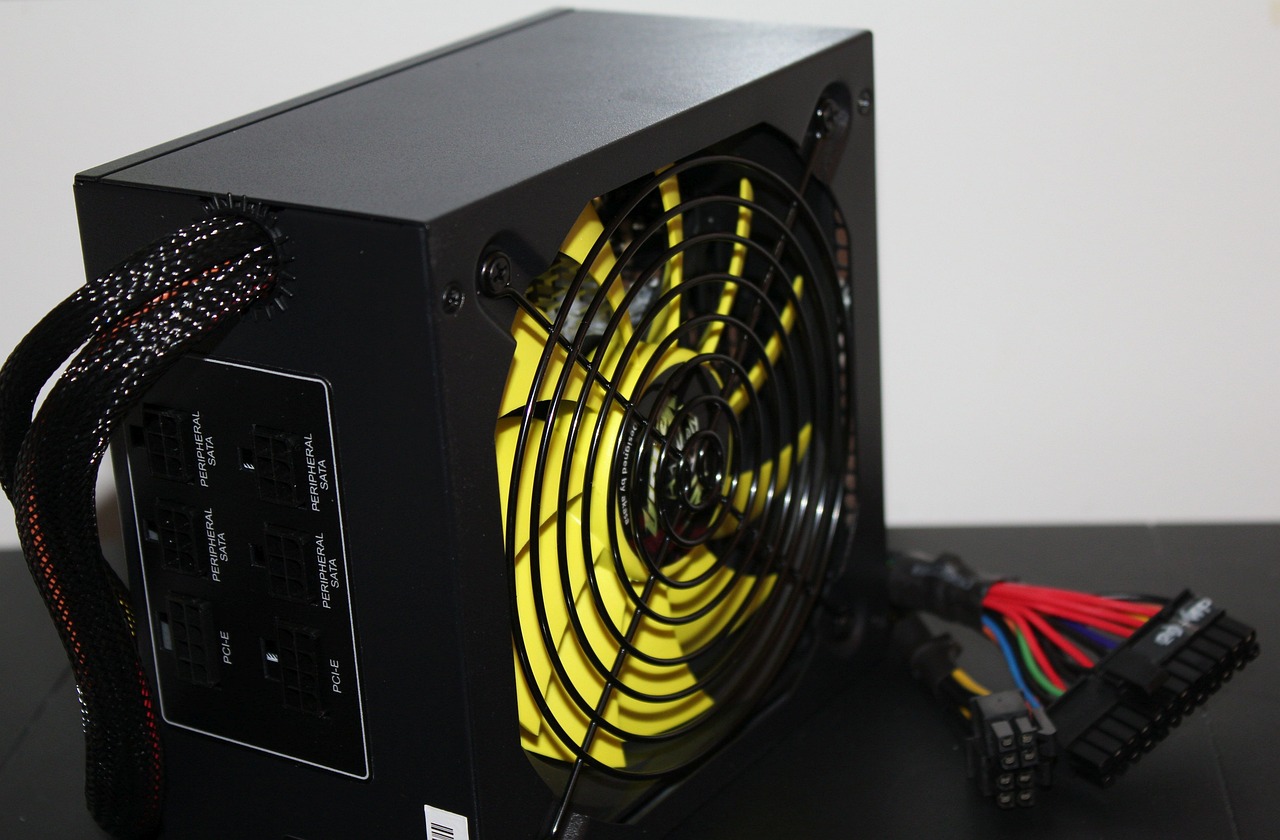
Essential PSU Connectors for Modern PC Components
- 24-pin ATX: powers the motherboard
- 4+4-pin or 8-pin EPS: powers the CPU
- 6+2-pin PCIe: powers compatible graphics cards
- 12V-2×6 (16-pin): powers modern high-power GPUs
- SATA power: powers SSDs, HDDs, and accessories
- 4-pin Molex: legacy devices and some accessories
Check the exact GPU and motherboard requirements before buying. Native GPU cables are generally preferable to adapters, and you should seat connectors fully and avoid sharp bends close to the plug.
Connectors to verify before buying:
- [ ] Number of PCIe or 12V-2×6 GPU connectors
- [ ] Single or dual EPS CPU connectors
- [ ] Enough SATA connectors for your drives
- [ ] Cable lengths suited to your case
ATX 3.0, ATX 3.1, and PCIe 5.0/5.1 Compatibility
ATX 3.0 and ATX 3.1 are PSU design standards built to handle demanding transient loads from current-generation graphics cards. They introduced the 12VHPWR connector, later revised into 12V-2×6 with an updated sense-pin design for more reliable contact. Note the distinction: PCIe 5.0/5.1 describes the GPU interface generation, while ATX 3.0/3.1 governs PSU design. A native 12V-2×6 cable simplifies compatibility with supported modern GPUs, though older PSU standards can still serve certain configurations well.
PSU Form Factors: ATX, SFX, and SFX-L
Standard ATX units suit most mid-tower cases, while compact SFX and SFX-L designs target small builds. Check PSU length, mounting compatibility, and cable clearance. In Mini-ITX systems, space, cooling, and routing are all tighter.
| Form Factor | Typical Dimensions (W × H × D) | Compatibility | Common Application |
|---|---|---|---|
| ATX | 150 × 86 × 140–180mm | Standard ATX cases | Mainstream and high-end desktops |
| SFX | 125 × 63.5 × 100mm | SFX-capable small cases | Mini-ITX and compact builds |
| SFX-L | 125 × 63.5 × 130mm | Cases supporting SFX-L | Compact builds needing a larger, quieter fan |
How to Select a Reliable PSU and Avoid Common Buying Mistakes
What to Look for When Comparing PSU Brands and Models
The exact model and platform matter more than the brand name. Independent reviews that measure voltage regulation, ripple, efficiency, thermals, noise, and protection behavior reveal what spec sheets do not. Established makers such as Seasonic, Corsair, be quiet!, Super Flower, and EVGA are worth researching, but quality varies between models within any brand.
Five essential checks before purchasing:
- Independent review results for the exact model
- Sufficient wattage and required connectors
- Verified physical fit and cable clearance
- Warranty length and support reputation
- Product revision and cable availability
For a deeper look at component specifications, the Tom’s Hardware PSU buying guide is a respected independent resource.
Common PSU Buying Mistakes to Avoid
Choosing on wattage or price alone is risky. An 80 PLUS Gold badge does not guarantee superior internal components. Compatibility errors, such as too few GPU connectors, wrong dimensions, or ignoring CPU power needs, are also frequent. Never use modular cables from another PSU model, even if the connectors fit, because pinouts can differ and may destroy components.
- Buying an underpowered PSU without accounting for peak demand.
- Choosing an unknown or poorly tested model based on price alone.
- Ignoring connector and form-factor compatibility.
- Prioritizing efficiency certification over actual electrical performance.
- Overlooking warranty coverage and future upgrade requirements.
Final PSU Buying Checklist for Different PC Builds
Prioritize according to your build: budget office PCs favor reliability and low cost; mainstream gaming systems need solid wattage and adequate GPU connectors; high-end gaming PCs benefit from ATX 3.x, high efficiency, and strong transient handling; compact workstations demand SFX compatibility and low noise.
- Confirm total system power requirements
- Choose appropriate wattage with reasonable headroom
- Verify GPU and motherboard connector compatibility
- Check ATX/SFX form factor and case clearance
- Compare efficiency ratings and independent test results
- Confirm essential electrical protection features
- Review noise levels and cooling design
- Check warranty terms and manufacturer support
- Consider realistic future hardware upgrades
Conclusion
Choosing the best power supply unit for your PC build means looking well beyond a wattage figure. Match capacity, efficiency, electrical protection, modern connectors, and physical dimensions to your system’s real requirements, and verify quality through independent testing rather than marketing claims. A well-tested, reliable PSU keeps your system stable, protects valuable hardware, and gives you room to upgrade with confidence.